How TeamVoice works
From the final whistle to your next training session.
Coaches see one game. The team experiences many.
Those perspectives are rarely captured or used.

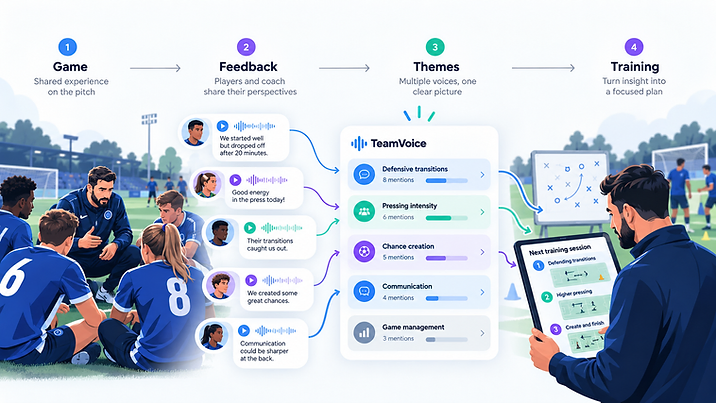
TeamVoice turns those individual voices into structured themes, helping coaches understand what the team experienced, where perspectives differ, and what issues are appearing repeatedly.
That insight can then be used to shape training priorities and suggest areas for the next session, giving coaches a clearer starting point rather than expecting them to manually collect feedback, interpret it, remember previous conversations and build the next training plan from scratch.
The result is better-informed coaching with less admin.
TeamVoice helps coaches spend less time gathering and organising information, and more time doing what matters: supporting players, designing better sessions and coaching the team.
- 1
Create a match or session
Set up the collection in seconds — match details or a training session.
- 2
Choose your questions
Use a template or write your own. Voice, text, nominations, multiple choice or private.
- 3
Share the link or QR code
Send it to your team. Players contribute without logging in.
- 4
Players speak or type
No account, no friction. Voice or text — whatever suits them.
- 5
Coach records their own view
Add your reflection so TeamVoice can compare it with the team's.
- 6
TeamVoice compares perspectives
See what you both saw, what you saw and what the team experienced.
- 7
Review the actual evidence
Every insight links back to the real transcript it came from.
- 8
Decide what to train next
Turn the collective picture into your next training focus.